

Windows · Local · Radeon

Forge anything.

On AMD / AMD

AMD / AMD means the processor and the graphics card. Describe a character, a prop, or an object you need to see. FORGE paints the image, shapes a textured model on your Radeon, and packs a Unity folder. The work stays on the PC.

Check the machine before you install.

  • v0.05
  • 16 GB of VRAM
  • Weights stay local
A low-poly golden dog forming beside its wireframe, in ember light on a dark grid.
From a line of light to a model you can turn.

01 — Describe

Say it in one line.

Type the line in the desktop app and press Enter. The first word chooses the job. You can begin with “please.” The app skips that and reads the next word. A build asks you to name the project before it starts.

  1. Model

    forge, build, make, or mold

    Name the object after the verb. FORGE suggests a project name from the line, then a few more from the local chat model. Click one, or type your own. The name labels the result and the folder under Documents\FORGE. Write named Buddy to skip the question. The line you typed is saved as prompt.txt.

    forge a friendly golden dog named Buddy

  2. Image

    generate, create, imagine, or image

    FORGE paints the picture and stops. It does not rewrite the line, and it does not build a mesh. Ask for high quality and it paints, then upscales the picture 4× to 3072 px.

    generate a wooden toy boat

  3. Super resolution

    super, premium, or draft

    The word chooses the build. super, superior, supreme, premium, prime, high quality, HQ, ultra, best, detailed, hi-res, or masterpiece means high quality: 1024 geometry, 20 steps, a 2048 px texture atlas, and 4K Unity textures. draft or low quality is faster and rougher. If the 1024 weights are missing, or the GPU runs short, FORGE finishes at standard quality.

    forge me a super apple

  4. Attachment

    The + button, or a file you drop

    A PNG, JPEG, WebP, GLB, or FBX sits in the message field as a chip, with the next step beside it. A GLB offers Preview and Rig. An FBX offers Rig. An image offers Build 3D, Remove background, and Upscale. A .txt file becomes the prompt, ready to review. Anything else is refused. Hover the chip and use × to clear it. With nothing attached, Rig, Upscale, and Remove background ask you to select a file.

  5. Small talk

    A hello, a question, or an idea

    A greeting or a question stays a conversation. The local chat answers while a build is running, and a hello does not start a project. Describe an object and two buttons appear, naming exactly what they will make: an image of it, or a 3D model of it. After a real idea, forge it uses that idea. A verb by itself, such as forge with nothing after it, asks what to create.

    a red lantern for a night market

  6. Jobs

    A card for every project

    Each project gets a card above the message field: Queued, Working, Done, Failed, or Cancelled, with the stage and the elapsed time. Jobs run one at a time, oldest first. Cancel drops a queued job or stops a running one, including FLUX, TRELLIS, Blender, and UniRig, and removes the unfinished files. Click a card to jump to that project. Your lines sit on the right. FORGE’s sit on the left. While it runs, the conversation shows the polished prompt, the reference image, the cutout, and the model as each one is ready. Ctrl + L shows the raw log.

02 — Pipeline

Then the machine does the rest.

A model request runs all four stages. An image request stops after the picture, unless you asked for high quality, which then upscales it 4×. One job runs at a time. The conversation shows each piece as it is ready. Ctrl + L opens the raw log.

  1. 01

    Enhance

    A model request is rewritten into a fuller prompt. An image request skips this.

  2. 02

    Paint

    FLUX.1-schnell paints the picture on this PC. An image request ends here.

  3. 03

    Shape

    TRELLIS.2 builds a textured GLB on the Radeon, through Vulkan.

  4. 04

    Pack

    Blender writes the FBX and textures. Real-ESRGAN scales those textures to 4×.

03 — Studio

Turn the real results.

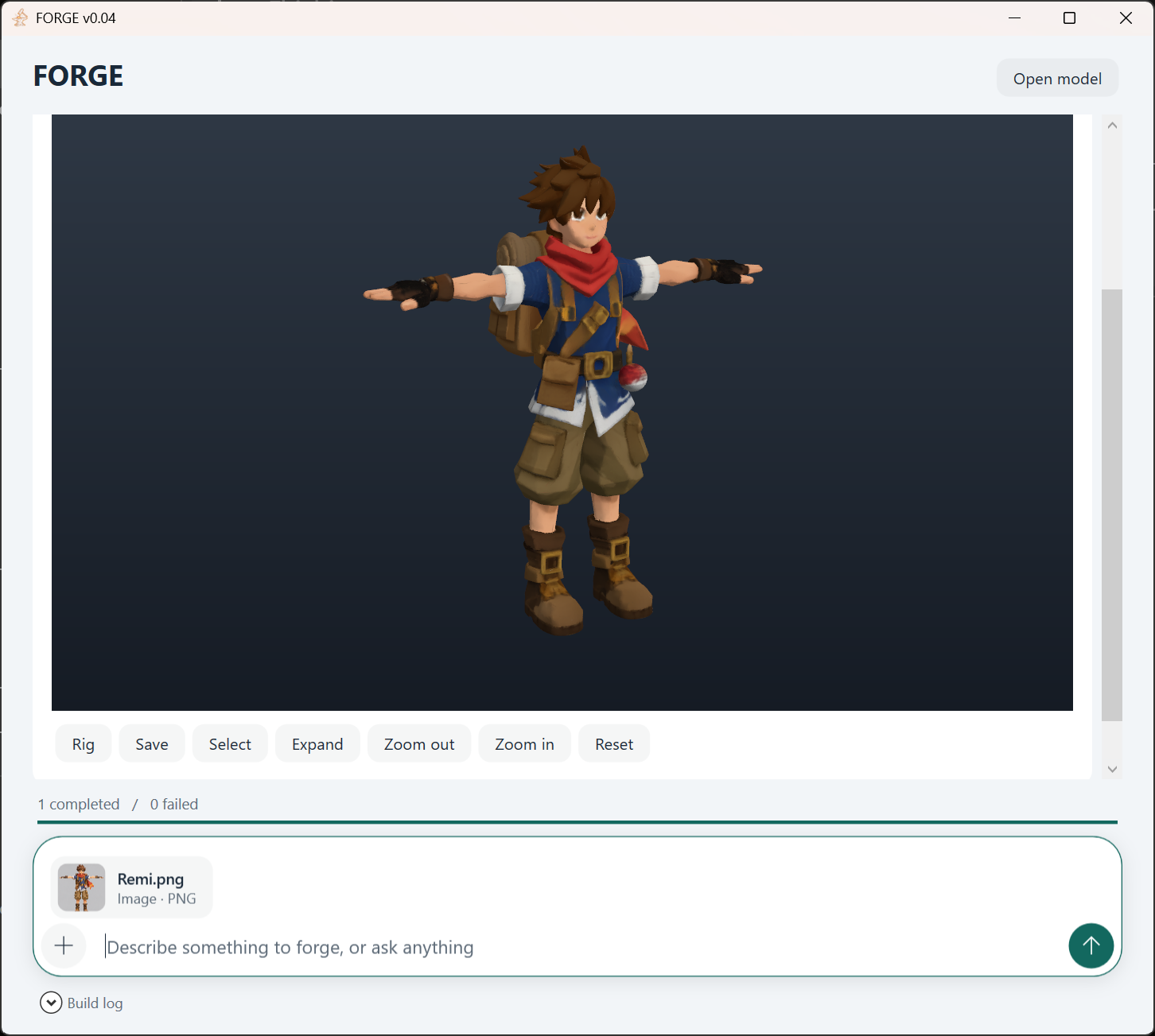
Buddy, a wooden toy boat, and Remi were built on this workstation. The picture is the reference. The mesh beside it is the GLB. Drag to orbit, and scroll to zoom.

Reference image
Reference image of a golden cartoon dog named Buddy, painted by FORGE
forge a friendly golden dog named Buddy

Loading Buddy…

The FORGE desktop app with Remi in the view, camera controls underneath, and Remi.png attached.
The desktop app, with Remi in the view. Attach a file with +, and the chip offers the next action. The line underneath is where you describe the next job.

Documents\FORGE\Buddy_…

  • prompt.txt
  • Buddy.png — reference
  • Buddy.glb — textured mesh
  • pipeline.log
  • Buddy-asset\
    • Buddy.fbx
    • textures, upscaled 4×

04 — Uses

Who needs the object.

A job is one picture, one textured mesh, and a Unity folder. The person who asked for it still finishes the asset. These are the trades that start from a sentence.

Games

A prop before the production model.

  • Indie game developer

    Builds and ships a game alone, or with a few people. They write the code, pick the art, and decide the design. A sentence becomes a lantern, a creature, or a crate they can import tonight and replace when the silhouette is wrong.

  • Game designer

    Decides the rules, the items, and what the player holds, opens, and walks past. The design usually starts as a paragraph. They forge a first version so a review can look at the item.

  • Game developer

    Writes the systems: inventory, interaction, combat, physics. They need a mesh with a texture so a mechanic can be played before an artist is free. The Unity folder is that stand-in.

  • Level designer

    Lays out spaces and the things that belong in them. A door, a lamp, a crate, or a sign can sit in the blockout while the real art is still a note in the doc.

  • Environment artist

    Fills a scene with dressing: stones, furniture, street kit, foliage clumps, and set pieces. Each job leaves a mesh and textures they can scale, dress, or throw away.

  • Character artist

    Designs and models the people, creatures, and costumes. They start from the painted image and the textured mesh, then rebuild the face, the hands, and anything that has to bend.

  • Prop artist

    Models the objects a character holds and the world is full of. Weapons, tools, food, furniture. The reference image and the rough mesh are the block-in they measure against.

  • Technical artist

    Connects art to the engine. They bring the FBX and the 4× textures into Unity, check scale and materials, and write down what the generator cannot be trusted to do.

3D production

A rough with the files still attached.

  • 3D modeler

    Builds the model people ship. They study form, retopologize, and clean the mesh until it is ready for a game, a film, or a client. FORGE is the rough they measure: the prompt, the reference, and a mesh with the form already blocked in.

  • Texture artist

    Paints how a surface reads: color, wear, cloth, metal, dirt. The upscaled maps are a starting color on the mesh. The final material is still their work.

  • Look-development artist

    Decides how an object looks under light, before a final shader exists. They orbit the GLB, judge the color, and send notes back to modeling and texturing.

  • Art director

    Sets the look of a project and picks between attempts. They compare silhouettes, color, and mood. Every job keeps its prompt, image, mesh, and log, so the chosen look has a file behind it.

  • Digital sculptor

    Pushes form in a sculpting app until the volume feels right. A generated mesh gives them a volume to push against, then they rebuild the parts that matter.

  • Freelance 3D artist

    Takes a client brief, usually a paragraph, and sends files back on a deadline. The picture and the mesh go out the same day. The cleanup is the part they bill for.

Visualization

An object in the scene, not the whole scene.

  • Archviz artist

    Makes stills and walkthroughs of rooms and buildings for clients. They place furniture, fixtures, and hero objects into that scene. FORGE builds the object. The building stays in their own scene.

  • Interior designer

    Chooses furniture, lighting, and fixtures for a real room. A sentence becomes a chair, a lamp, or a vase they can turn in a meeting before anyone orders it.

  • Industrial designer

    Studies how a product is shaped, held, and made. Before CAD, they check proportion. The mesh is a sketch in three dimensions, a form to look at from the side.

  • Product designer

    Presents a thing that may not exist yet: a device, a bottle, a tool. The image is the slide. The GLB is the same object, turned, so a review can walk around it.

  • Exhibit designer

    Fills a gallery, a booth, or a museum case with objects a visitor understands at a glance. A generated piece is the stand-in while the real build is still being quoted.

  • Packaging designer

    Designs the box, the bottle, and the thing inside it. They need the object on a board, from more than one angle, before the dieline is drawn.

Film and animation

Something to point a camera at.

  • Previz artist

    Blocks a shot with temporary sets, cameras, and props so the move can be judged early. They drop a generated prop in, frame it, and throw it out when the real model arrives.

  • Concept artist

    Invents the look of a character, a creature, or a prop, usually as a painting. Here the sentence paints the board. The mesh shows whether that idea holds up from the side.

  • Production designer

    Decides the physical world of a film or episode: rooms, props, color, period. A generated object is something to point at in a meeting while the shop quotes the real build.

  • Animator

    Makes a character or a prop move across frames. They need a mesh to pose while the performance is being found. A production rig, with controls that survive a shot, is still their department’s job.

Teaching

One object, and every file it leaves.

  • Student

    Is learning the path from an idea to files someone else can open. They follow one object from the sentence to the image, the GLB, and the Unity folder, on a machine in the room.

  • Instructor

    Teaches a class how a pipeline works, and where it fails. They show the files a job leaves behind, and the repairs a person still has to make. The work stays on that PC.

  • Workshop lead

    Runs a room where everyone makes one object in an afternoon. Each person leaves with a picture, a mesh, and a folder, and nobody’s prompt went to a shared server.

Realtime

A mesh a scene can load today.

  • VR prototyper

    Tests an idea in a headset: reach, scale, and whether the object is worth holding. The GLB goes into the scene as a stand-in with a texture already on it.

  • AR developer

    Places a single object in a camera view of a real room. They need a small textured mesh fast, then they handle tracking, scale, and the app around it.

  • Unity developer

    Builds the scene, the scripts, and the build. The packed folder is already an FBX plus four textures, so the import is a drag into the project.

  • Web 3D developer

    Puts a model in a browser so a visitor can orbit it. They load the GLB in a page, the same way this site loads Buddy, the boat, and Remi.

Marketing and play

A thing people can look around.

  • Creative director

    Presents a product, a campaign object, or a mascot that may not be manufactured yet. They need a picture for the deck and a turntable for the room.

  • Tabletop designer

    Makes board games, card games, and role-playing pieces: tokens, creatures, scenery. A generated mesh is a stand-in on screen while the illustration and the print files are drawn by hand.

  • Toy designer

    Explores a figure, a vehicle, or a playset as a form. They turn the mesh in a review, then take the approved shape into sculpting and manufacturing drawings.

  • Content creator

    Explains an idea on video or a page with an object people can see. The image is the thumbnail. The model is the thing they spin while they talk.

The mesh is a start. Topology, a production rig, a building, and a file you can send to a printer are still a person’s job.

05 — Machine

A dedicated AMD PC.

Setup checks the hardware, then installs a private runtime under your user profile. Generation uses the weights on disk.

System
Windows x64
Processor
AMD
Graphics
ROCm-compatible Radeon, 16 GB dedicated VRAM, Vulkan driver
Memory
32 GB
Disk
100 GB free for the runtime, models, caches, and temp files

The hardware check allows 256 MiB of driver-reserved VRAM on a nominal 16 GB board. FLUX.1-schnell is gated: accept its license and sign in on Hugging Face on this PC before the first launch. If setup stops, open FORGE again. The log is at %LOCALAPPDATA%\FORGE-Data\setup.log.

Uninstall from Settings, Apps, FORGE. Windows removes the app and the private runtime. Generated models and downloaded weights stay on disk.

Thanks

Standing on other people’s work.

The FORGE application is public domain, under the Unlicense. The models and tools it runs are not. Code, weights, and the things you generate can sit under different licenses. Read each one before you ship or sell.

06 — Install

Put it on the workstation.

v0.05 checks the machine, installs FORGE, and prepares the runtime. It upgrades v0.01 through v0.04 in place and keeps the runtime already on the PC. You can take the MSI instead and let the first launch finish setup.